
Stock management: know what you've got and where it is
Suppliers, purchase orders, stocktakes, reorder automation and barcode/lot tracking — stock control built for SMEs, not a spreadsheet with delusions.
What you get

Suppliers & purchase orders
Manage suppliers and raise POs against them, received into stock with full traceability. Each supplier has its own page with order history, the products it is preferred for and, once approved in QMS, its scorecard.
Stocktakes
Scheduled or ad-hoc counts to keep book stock matching what's really on the shelf. Bring products, stock and suppliers in from a spreadsheet, and export any of them back out.
Reorder automation
Set a reorder point per product, or let demand-based suggestions — from your sales velocity and supplier lead times — auto-draft the purchase orders before you run out.
Barcode, lot & serial tracking
Scan goods in and out, and trace any lot or serial number back to its supplier and every order it shipped on. Lots with an expiry date raise an alert before they go out of date.
Weighted-average valuation
Stock value calculated properly as purchase costs change, not a guess at year-end.
Kitting
Bundle components into kits and finished items, with stock adjusted automatically across everything in the kit.
Try reorder automation — right here
Receive a purchase order and watch the stock level and status update. Demo — sample data, resets on reload
| Product | On hand | Reorder point | Status |
|---|---|---|---|
| Steel Backing Plate (10mm) | 18 | 50 | Low stock |
✓ 200 units received against PO-2044 — stock updated, lot number logged, status back to In stock.
Stock that talks to the rest of the business
Because Inventory runs on the same core as every other module, low stock can trigger a workflow, a purchase order can be discussed in Comms, and stock value feeds straight into your reporting — without a separate stock system to reconcile.
Beyond a stock count — make it, cost it, place it
The depth a growing operation needs once a spreadsheet stops coping.
Work orders
Build finished goods ahead of time: a work order consumes the component stock, produces the finished item and rolls the component cost into it — production, not just assemble-at-sale kitting.
Landed costs
Spread freight, duty and other landed costs across a purchase order’s lines, so stock is valued at what it really cost to get on your shelf.
FIFO, FEFO & average costing
Value stock by weighted-average, or FIFO and FEFO (first-expiry-first-out) for batch-tracked goods — so cost of sales and margins are right.
Bins & transfers
Track stock down to a bin within a warehouse, and move it between bins and between warehouses with the movement recorded either way.
Inventory Management for Small UK Businesses
Stock spreadsheets fail the same way everywhere: the count is right until the second person edits it. Then purchasing happens from memory, a stockout stops a job, and the year-end count becomes archaeology.
OpSemble keeps quantities live because the operations that change stock — purchase orders received, items picked, stocktakes counted — are the same records everyone works from. Reorder points raise draft POs before you run out. Lot and serial tracking gives traceability when a supplier batch goes wrong, which is also what your quality system will ask for. Weighted-average valuation keeps the accountant happy without a separate export.
At £6 per user/month it's priced for the storeroom, not the warehouse-automation market. Manufacturers should see how inventory, quality and projects work together.
Frequently Asked Questions
Can OpSemble Inventory track suppliers and purchase orders?
Yes. Record suppliers, raise purchase orders against them, and receive stock in against the PO with full traceability of what came from where.
Does it support reorder automation?
Yes. Set a reorder point per product and get notified — or auto-raise a purchase order — before you run out of stock.
Can I track batches, lots or serial numbers?
Yes. Scan goods in and out by barcode, and trace any lot or serial number back to its supplier and every order it shipped on — important for recalls and compliance.
How is stock value calculated?
By default, weighted-average valuation, so stock value reflects real cost as purchase prices change over time. You can also cost items FIFO or FEFO (first-expiry-first-out) for batch-tracked stock, and landed costs like freight and duty are allocated into the value — so cost of sales and margins are right, not a guess at year-end.
Can I sell bundles or kits?
Yes. Bundle components into kits and finished items — stock for every component adjusts automatically whenever a kit is built or sold.
Can I manufacture or assemble products?
Yes. As well as kits that deplete when sold, you can raise a work order to build finished goods ahead of time — it consumes the component stock, produces the finished item and rolls the component cost into it. Stock can be tracked down to a bin and moved between warehouses too.
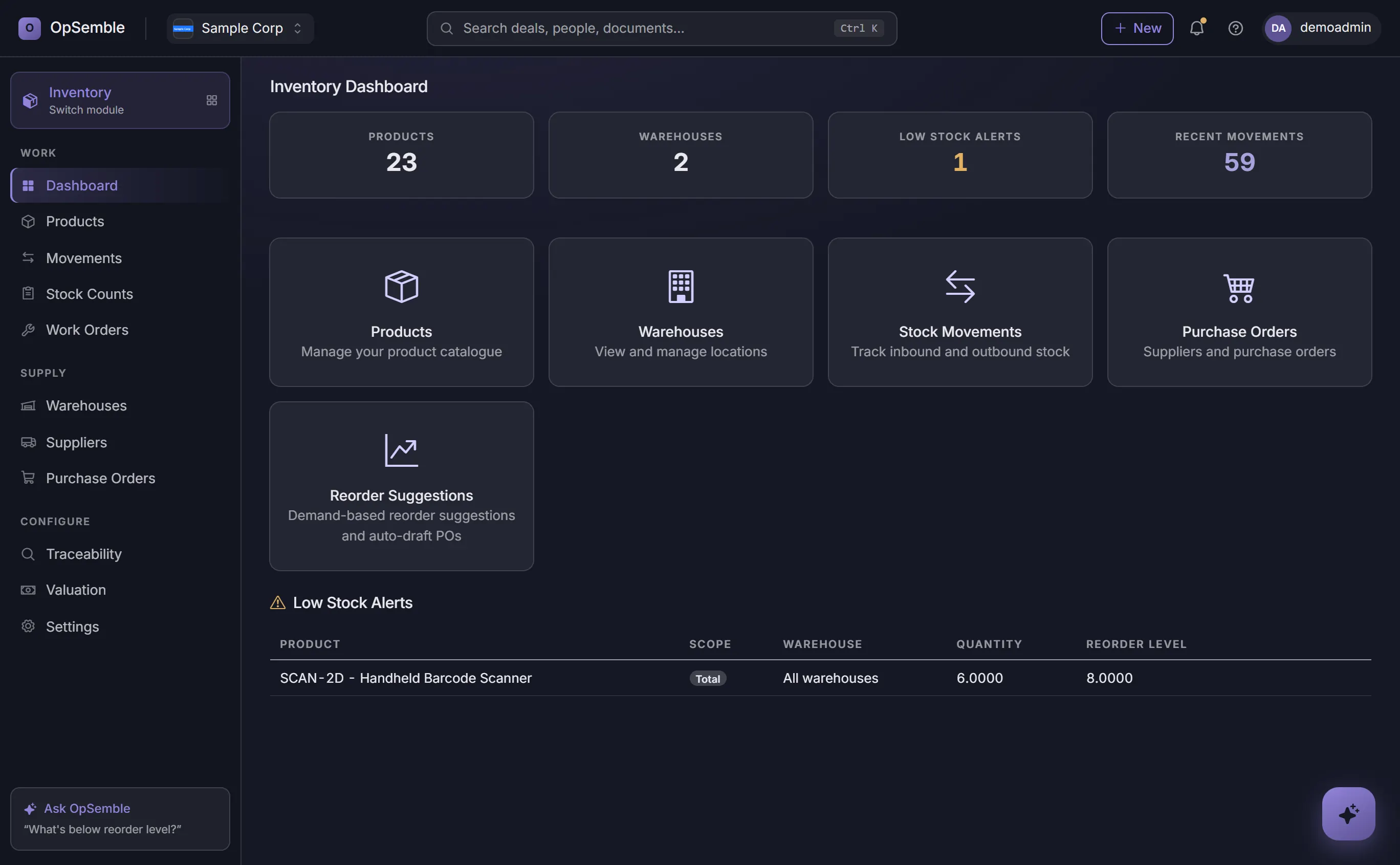
Stock, movements and reordering on one screen
The dashboard is the short version: how many products you hold, across how many warehouses, what has moved recently, and what has fallen below its reorder level — with demand-based reorder suggestions that can draft the purchase order for you.
One platform. Only the modules you need.
Inventory is one switch in your OpSemble tenant — turn it on alongside CRM, Projects, HR and Invoicing.
Explore related modules: Invoicing • CRM • See how they work together
Build your plan See pricing