
What you get
Kanban boards
Drag tasks through Todo, In Progress, Review and Done with priority badges and assignees.
Milestones
Group work under milestones with due dates and completion tracking.
Time tracking
Log hours against tasks and projects, and see effort roll up in reports.
Templates & plan from a brief
Start from a starter template, from one of your own well-run projects, or from a few sentences — describe the job and the assistant drafts the milestones, tasks and checklists for you to edit before anything is created.
Comments & collaboration
Discuss work where the work is — comments on projects and tasks keep context together.
Dashboards & reports

Active projects, team workload, overdue tasks and upcoming deadlines at a glance — and dashboards you build yourself from tasks, time and milestones, kept private or shared with the team.
Try the task board
Drag tasks across the columns. Demo — sample data, resets on reload
Plan and track delivery — beyond a kanban board
The views a growing delivery team needs, not just a wall of cards.
Editable Gantt
Drag a task to reschedule it, resize it to change its dates, and set dependencies between tasks — a proper timeline, editable right on the chart.
Portfolio view
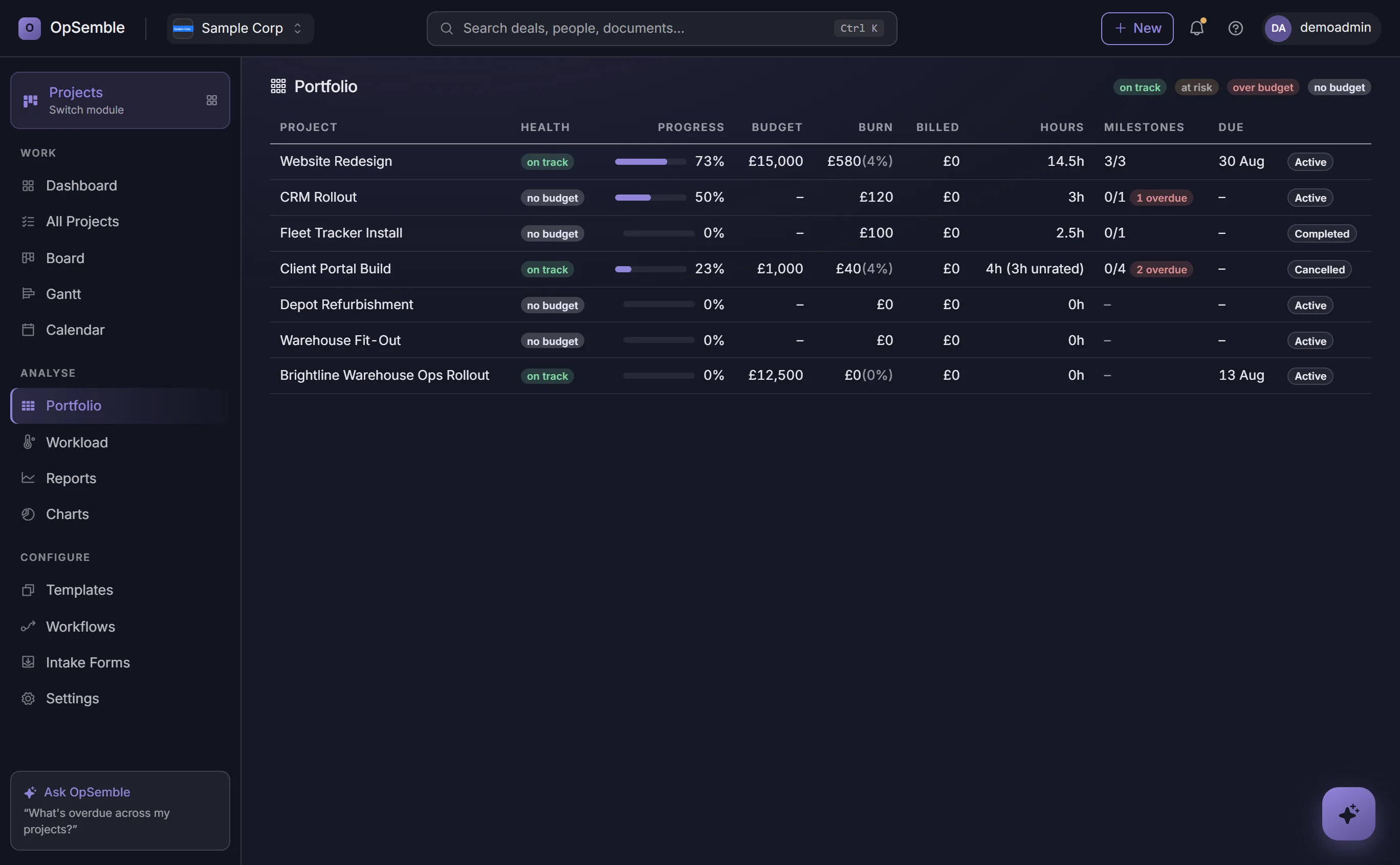
Every project on one screen with a RAG health flag, budget versus spend, hours and milestone slippage — so you see trouble before it lands.
Workload heatmap
See who is free, busy or over-allocated week by week — capacity is net of approved leave from HR, so you rebalance before someone burns out.
Intake forms
A public link that turns an outside request into a task in the right project — no login, no shared inbox, and no re-typing.
Board, calendar & charts
Switch the same work between a kanban board, a calendar, a list, and burn-down and velocity charts — whichever view fits the moment.
The weekly update, written for you
One click writes the status update from the week’s actual activity — what was finished, what slipped, what is blocked, hours by person — ready to post as a comment or paste into an email.
Projects that pay for themselves
Track the time, cost and margin — and turn delivered work into an invoice.
Time tracking & bill rates
Log time against tasks and projects as billable or non-billable, with a cost and bill rate per person — typed in afterwards, or from a start/stop timer as you work.
Billable time → invoice
Turn a project’s unbilled time into a draft invoice in a click, priced at each person’s bill rate and ready to review and send.
Budget vs burn
Set a budget and watch actual spend and hours against it — real job costing, so you know a project’s margin before it’s over.
Client guest portal
Give a client a secure link to see progress, milestones and shared documents — without a login or a seat, and without exposing your internal notes.
Time a job while you’re doing it
Start a clock on a task, or on the project as a whole, and stop it when you’re done — the elapsed time becomes a proper time entry, dated when you started. No trying to remember on Friday what Tuesday afternoon went on.
One clock per person, so starting a timer somewhere else banks the one already running rather than losing it. Discard a clock left running over lunch, or delete an entry you got wrong — unless it has already been invoiced, in which case the record stands.
The board your team actually works from
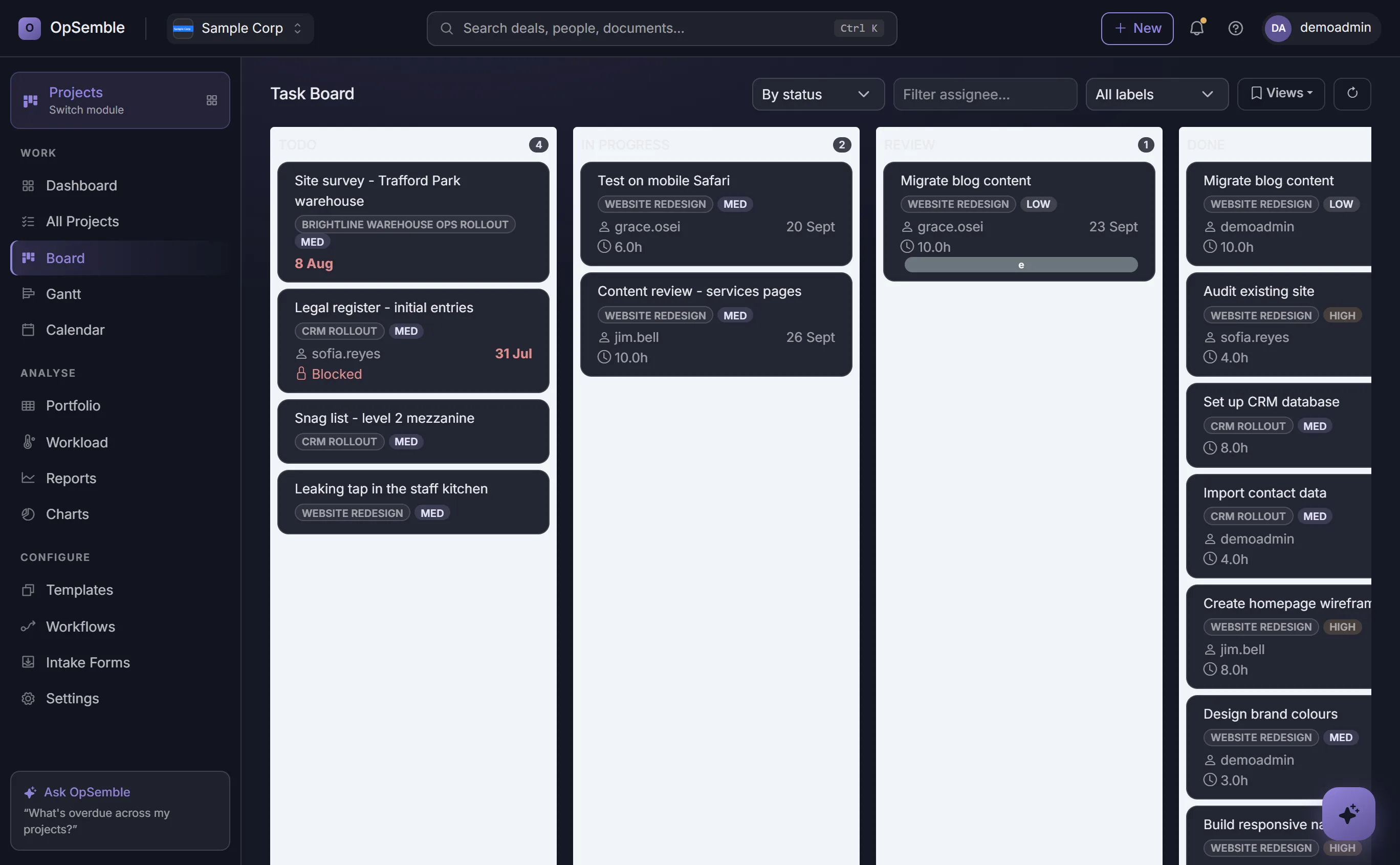
Todo, in progress, in review, done — across every project or just one. Drag a card to move it, filter by assignee or label, and switch the same work to a Gantt, a calendar or a burn-down chart when you need a different angle on it.
Let people outside the business raise work
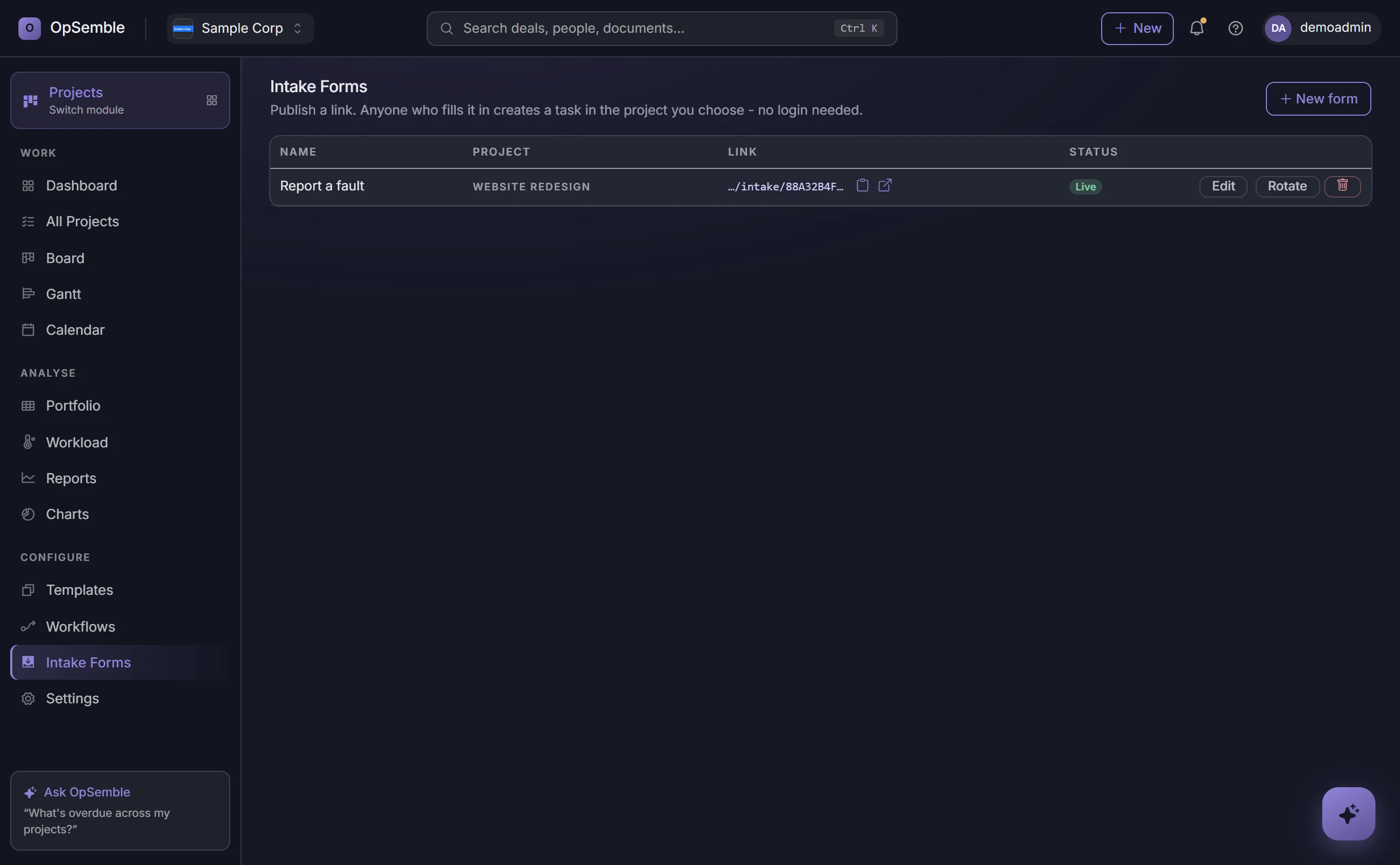
Publish a link and anyone can fill it in — a client, another department, a tenant reporting a fault — and their request lands as a task in the project you choose, at the priority you set, with whoever should know about it notified.
No login needed at their end, and no inbox in the middle. Ask whatever you need beyond name, email and a summary. Pause a form without deleting it, or rotate its link if it has been shared further than you intended — the old URL stops working while everything it has already collected stays put.
Project Management That Talks to the Rest of Your Business
Standalone project tools manage tasks well and stop dead at the edges: hours logged in the tool are retyped into payroll, a finished project becomes an invoice by hand, and the customer conversation lives somewhere else entirely. For a small business, those edges are where the admin time goes.
In OpSemble the edges are connected. Time tracked against a project feeds job costing and turns into a draft invoice at the person's bill rate. A won CRM deal can create the project, client attached, and the resource planner reads approved leave from HR. Site-based teams get the same board the office sees — one truth about what's on track and what isn't.
At £9 per user/month it replaces a dedicated project tool for less than most of them charge — and removes the re-typing between systems, which is the cost nobody budgets. Construction firms: see how contractors run sites on OpSemble.
Frequently Asked Questions
Can OpSemble Projects integrate with our CRM?
Yes. Link projects to CRM deals and contacts. When a deal converts to a won stage, automatically create a project, add team members and send them onboarding tasks — all from the visual workflow builder.
How does time tracking work?
Team members log time per task or project, tracking against billable and non-billable work. Billable time rolls straight into a draft invoice, and reports show your actual hours spent versus estimates for better forecasting next time.
Can clients see project progress?
Yes. Grant clients access to a secure project dashboard where they see milestones, open tasks and time-logged progress — without exposing internal team notes or budget details.
How do I manage project templates?
Create templates for your typical projects: define task structures, team roles, phases and milestones. Then spin up a new project from your template in seconds — all phases, tasks and dependencies copy over, ready to customize for the specific client. Or skip the template: describe the project in a few sentences and the assistant drafts the milestones and tasks for you to edit before it is created.
What happens when a team member is over-allocated?
The resource planner shows capacity: add a person to a project and you instantly see their other commitments and remaining capacity. Red flags show over-allocation so you can rebalance work before it becomes a problem.
Can projects be linked to the HR module?
Yes. Projects and HR share the same people, so the resource planner reads each person's approved leave from HR when it shows capacity and flags over-allocation.
How do I invoice work from projects?
Create an invoice straight from a project's unbilled time — OpSemble prices each entry at the person's bill rate and builds a formatted draft invoice ready to review and send.
Is there a Gantt chart and task dependencies?
Yes. The editable Gantt lets you drag a task to reschedule it, resize it to change its dates and set dependencies between tasks. The same work is also available as a kanban board, a calendar, a list, and burn-down and velocity charts.
Can I track budgets and see a portfolio view?
Yes. Set a budget per project and track actual spend and hours against it — real job costing — and see every project on one portfolio screen with a RAG health flag, budget-versus-spend and milestone slippage. A workload heatmap shows who is free, busy or over-allocated week by week.
One platform. Only the modules you need.
Projects is one switch in your OpSemble tenant — turn it on when you need it, alongside CRM, Projects, HR, Health & Safety, Quality and Training.
Build your plan