
Invoicing software: quote to paid, without leaving OpSemble
PDF invoices, Stripe payments, recurring billing and multi-currency — convert a won CRM deal straight into an invoice, and let clients pay you without the email chase. Then track supplier bills, reconcile the bank and see your cash flow, all in one place.
What you get
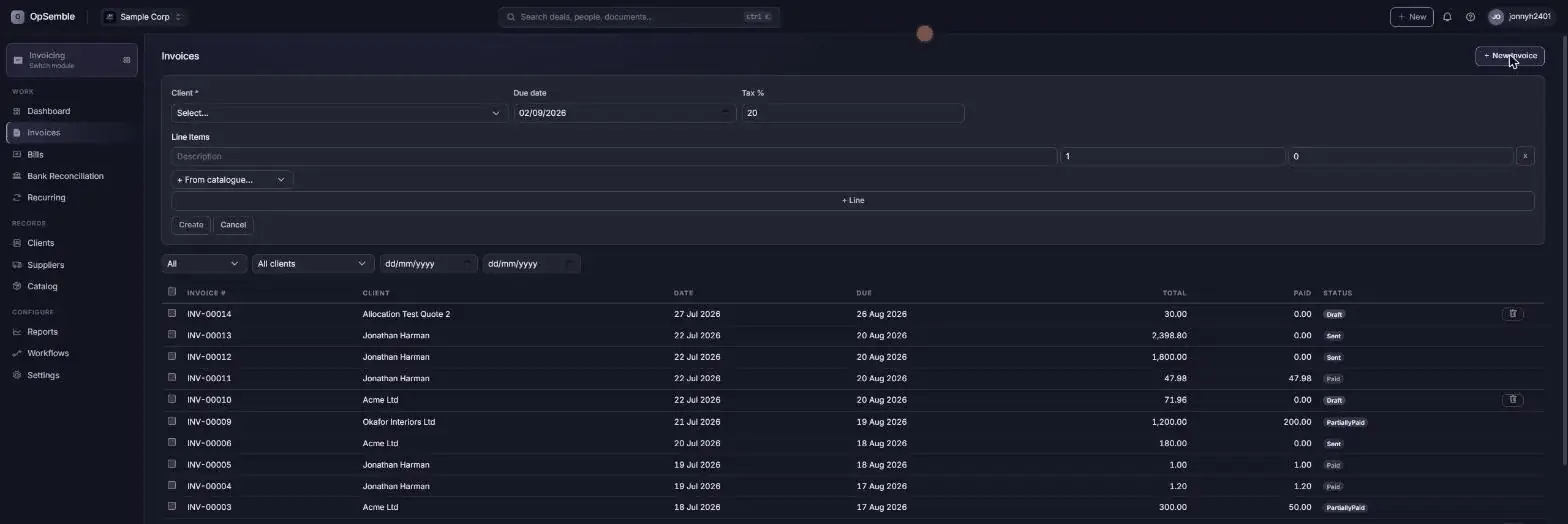
Invoices & credit notes
Numbered, PDF invoices and credit notes with your own branding, line items, tax and due dates.
Stripe payments
Card payments straight on the invoice via Stripe, with refunds handled in a click when you need to reverse one.
Recurring billing
Set an invoice to repeat weekly, monthly or annually — it goes out and gets paid on its own.
Multi-currency
Bill international clients in their own currency instead of converting everything back to GBP.
Dunning & late fees
Reminders on the days you choose before and after the due date, late fees, and a chase written from each customer’s own history — how overdue, what they have already been sent, how they usually pay — for you to edit and send.
CRM quote conversion
Turn a won CRM deal's quote into an invoice in one click — the line items and customer record carry straight across.
Try the quote-to-invoice flow — right here
Convert an accepted quote into an invoice, then record the payment. Demo — sample data, resets on reload
Quote Q-0142 · Norwood CNC Retrofit
| Item | Qty | Unit price | Line total |
|---|
Invoice INV-0091 · Due in 14 days · GBP
| Item | Qty | Unit price | Line total |
|---|
✓ Paid in full via Stripe — receipt emailed automatically, CRM deal marked won.
A look inside
Click through the screens your finance day actually runs on.
The money going out, not just coming in
Track what you owe suppliers alongside what customers owe you — and let AI do the data entry.
Suppliers & bills
Record suppliers and their bills, approve them, and mark them paid or part-paid — a real accounts-payable ledger, not a drawer of PDFs.
AI bill scan
Upload or photograph a supplier invoice and OpSemble’s AI reads the supplier, dates, line items and totals into a draft bill for you to check. No typing — and a bill that looks like one you already have is flagged before it is saved twice.
Payables at a glance
See everything you owe and when it’s due, so a bill never slips through and a supplier never has to chase you.
Multi-currency bills
Bills in any currency convert to GBP at the document’s snapshot rate, with realised FX gain or loss tracked when you pay.
See where you stand — and stay reconciled
The reporting and reconciliation that turn a pile of invoices and bills into a clear picture of the business.
Bank reconciliation
Import your bank statement and match transactions to invoices and payments, so your books agree with your bank. Unmatched lines suggest their own account, learned from where you posted that payee last time.
Cash-flow forecast
See what’s coming in and going out over the weeks ahead, built from real invoices, bills and recurring schedules.
Aged debtors & reports
Who owes you and how overdue, revenue by customer and month, and realised FX gain/loss — all exportable to CSV.
Xero sync
Already on Xero? Push your invoices, credit notes and contacts across so your accountant’s ledger stays in step.
VAT and Income Tax returns, built from the same records
Because your invoices and bills already live in OpSemble, your MTD VAT return writes itself: a full 9-box return generated from live data, with the digital records and fraud-prevention headers HMRC requires built in. MTD for Income Tax (ITSA) quarterly updates work the same way, and foreign-currency documents convert to GBP so the boxes reconcile to the penny.
This is in beta while we complete HMRC production onboarding — you can generate and review returns today, and live filing to HMRC switches on as certification finishes. Keep filing through your current route until then.
A real set of books, not just a list of invoices
Underneath the invoices and bills is a proper double-entry general ledger. Every document you raise posts itself: an issued invoice debits debtors and credits sales and output VAT, a supplier bill does the reverse, payments clear the balance. You can post manual journals for anything that doesn’t start as a document — accruals, depreciation, an opening balance.
The chart of accounts is yours to shape, with the account types an accountant expects rather than a simplified five: current and non-current assets, current and non-current liabilities, equity, income, other income, direct costs, overheads and tax. That split is what lets the reports show gross profit and current vs non-current properly. A single invoice can even spread its revenue across several income accounts, line by line.
Out of it come the three reports your accountant will ask for — trial balance, profit & loss and balance sheet — built from the same records that produced the VAT return and the bank reconciliation. Nothing is re-keyed, so nothing disagrees.
The same platform underneath, not a bolt-on
Invoicing runs on the same core as every other module — the customer portal shows clients their invoices alongside their quotes, the workflow builder can chase or notify on payment events, and every action lands in the shared audit log.
Invoicing Software That Chases So You Don't Have To
Late payment is a UK small-business tax. The work is done, the invoice is sent, and then someone has to remember to chase — politely, repeatedly, in writing. Most owners either do it late or don't do it at all.
OpSemble sends the invoice with a Stripe payment link, then runs the dunning for you: scheduled reminders, escalating tone, late fees where you've configured them. Recurring billing handles retainers and subscriptions. Quotes accepted in CRM convert to invoices without re-typing, and payment status is visible to whoever talks to the customer — not just whoever runs the books.
It's £8 per user/month, and "user" means someone raising invoices — the whole company doesn't pay for the finance function. Pair it with Projects to invoice from tracked time and milestones.
Frequently Asked Questions
Does OpSemble Invoicing take payments?
Yes. Invoices carry a Stripe payment link so clients can pay by card straight from the invoice, and refunds can be issued from the same screen if you need to reverse a payment.
Can I set up recurring invoices?
Yes. Set an invoice to repeat weekly, monthly or annually — OpSemble generates and sends it automatically on schedule, no manual re-entry.
Does it handle overdue invoices?
Yes. Configurable dunning sequences send reminder emails on a schedule, and you can apply late fees to invoices that stay unpaid past their due date. When a template is not enough, Draft chase writes one from that customer’s history — pitched from gentle to final as the days mount — and you edit it before it goes.
Can I invoice clients in a different currency?
Yes. Invoices support multiple currencies, so you can bill international clients in their own currency rather than converting everything to GBP.
Does Invoicing connect to the CRM?
Yes. When a CRM quote is accepted, convert it straight into an invoice in one click — line items, pricing and the customer record carry across automatically.
Can OpSemble track supplier bills?
Yes. Record suppliers and their bills, approve them and mark them paid, and see your total payables at a glance. You can also upload or photograph a supplier invoice and the AI bill scan reads it into a draft bill for you — no manual entry.
Can I get a P&L and balance sheet out of it?
Yes. OpSemble keeps a double-entry general ledger behind your invoices, bills and payments, with a chart of accounts you control and manual journals for anything that isn’t a document. Trial balance, profit and loss and balance sheet are all produced from it — the same records that drive your VAT return, so the figures agree.
Does it reconcile the bank and work with Xero?
Yes. Import your bank statement and match transactions to invoices and payments, with a cash-flow forecast and aged-debtor reports built from your real data. If you use Xero, OpSemble can push your invoices, credit notes and contacts across to keep your accountant's ledger in step.
Can I do Making Tax Digital (MTD) VAT and Income Tax?
MTD VAT and Income Tax (ITSA) are built in and currently in beta: returns generate from your live invoice and bill data with the digital records and fraud-prevention headers HMRC requires. We're completing HMRC production onboarding, so live filing switches on as certification finishes — keep filing through your current route until then.
One platform. Only the modules you need.
Invoicing is one switch in your OpSemble tenant — turn it on alongside CRM, Projects, HR and the rest. Win a deal in CRM and it's ready to invoice in one click.
Explore related modules: CRM • Inventory • See how they work together
Build your plan See pricing