
Home / Modules / Quality management, audit-ready by default
Quality (QMS)Quality management software, audit-ready by default
Controlled documents, NCRs, CAPAs, audits, risks, calibration and suppliers — with stage-gate approvals, a clause-by-clause ISO 9001 register and a complete audit trail baked in.
What you get

Document control
Numbered, versioned documents with a draft-review-approve workflow and read acknowledgements.
Non-conformance reports
Raise NCRs with severity and source, investigate, disposition and close — all linked.
CAPAs
Corrective and preventive actions with owners, due dates and effectiveness reviews.
Audit builder & programme
Build your own checklists or start from a clause-by-clause ISO 9001 internal audit, a supplier audit and a process audit. Schedule them, run them on a phone with photos and signatures, and raise an NCR from any failed question.
Risks & opportunities
The clause 6.1 register every certification audit asks for: a 5×5 heat map, treatment, owner, residual score and review reminders.
Measuring equipment
Calibration cadences, certificates and a logbook for every instrument that decides conformity. A failed calibration quarantines the item and raises an NCR against it.
Approved suppliers
A supplier register with approval status, quality ratings and review dates.
ISO 9001 register
Every clause of ISO 9001:2015, including Amendment 1 (2024), tracked clause by clause, with a readiness percentage, evidence from your own records, and a printable readiness report.
Trends on the dashboard
Twelve months of NCRs raised against closed, complaints received against closed, and CAPAs closed on time or late, with NCRs by source and severity — the clause 9.3 inputs a management review reads out.
Automation & alerts
Tell the quality team the moment a critical NCR or a complaint lands; overdue CAPAs and documents falling due for review chase themselves.
Audit-day exports
Every register as a spreadsheet, any controlled document as a PDF with its control block and an "uncontrolled when printed" footer.
Audit-ready by default
Every transition is logged — who, what, when — so evidence is a filter, not a scramble.
Try the approval gates
Documents move Draft → Review → Approved, and authors can never approve their own work. Demo — sample data, resets on reload
Audit trail

Every non-conformance, linked to its corrective action
Raise an NCR with a description, root cause and disposition, then link it to a CAPA with an owner and due date — nothing gets closed out without evidence, and nothing falls through the cracks.
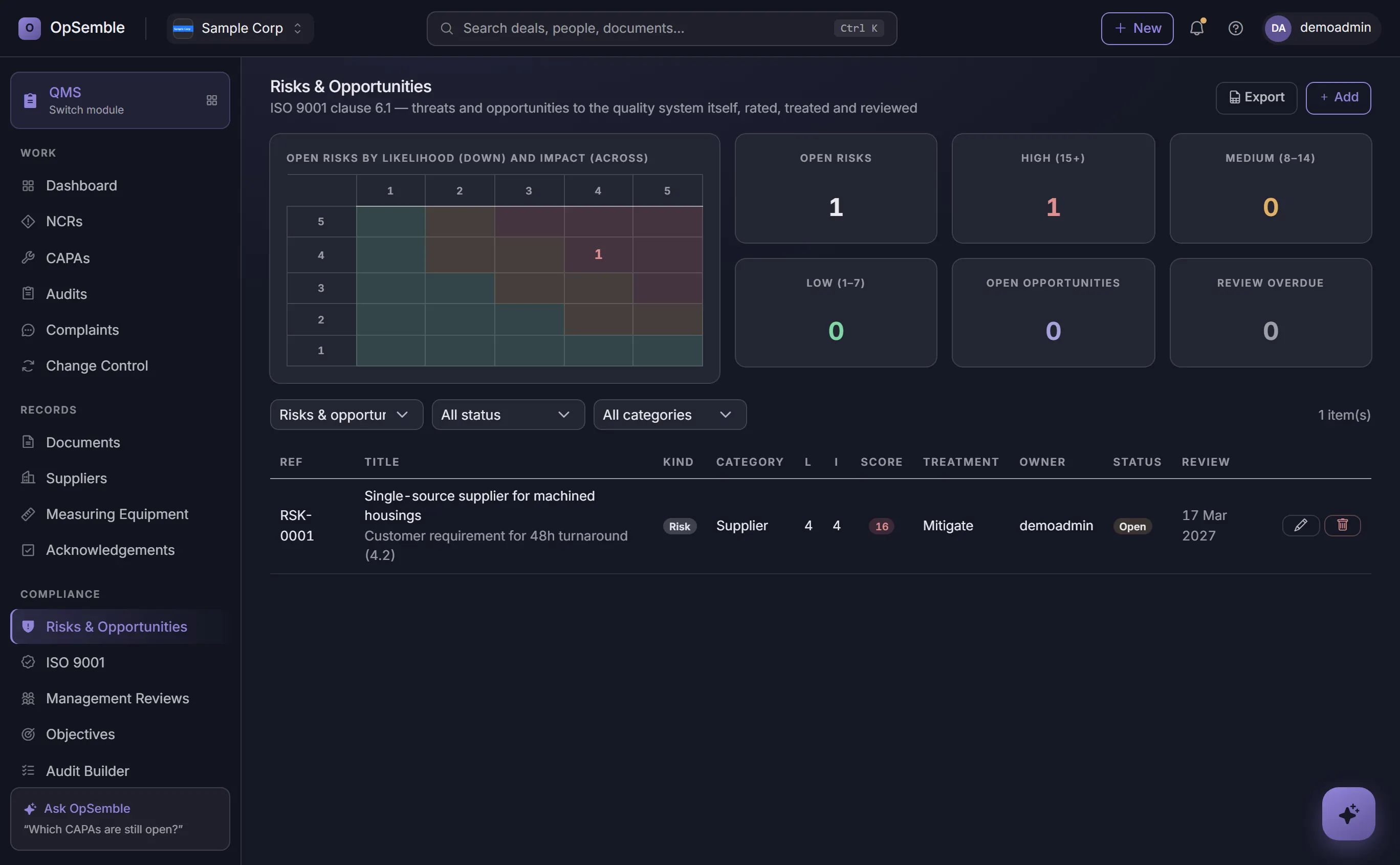
The register every certification audit opens with
Clause 6.1 asks how you address risks and opportunities to the quality system itself — a single-source supplier, a key-person dependency, a new market. Rate likelihood and impact, decide the treatment, name the owner and the controls, and the 5×5 heat map shows where the exposure sits.
Every entry carries a review date the owner is reminded of, links to the CAPA carrying the action, and stands as evidence against clause 6.1 in the register.
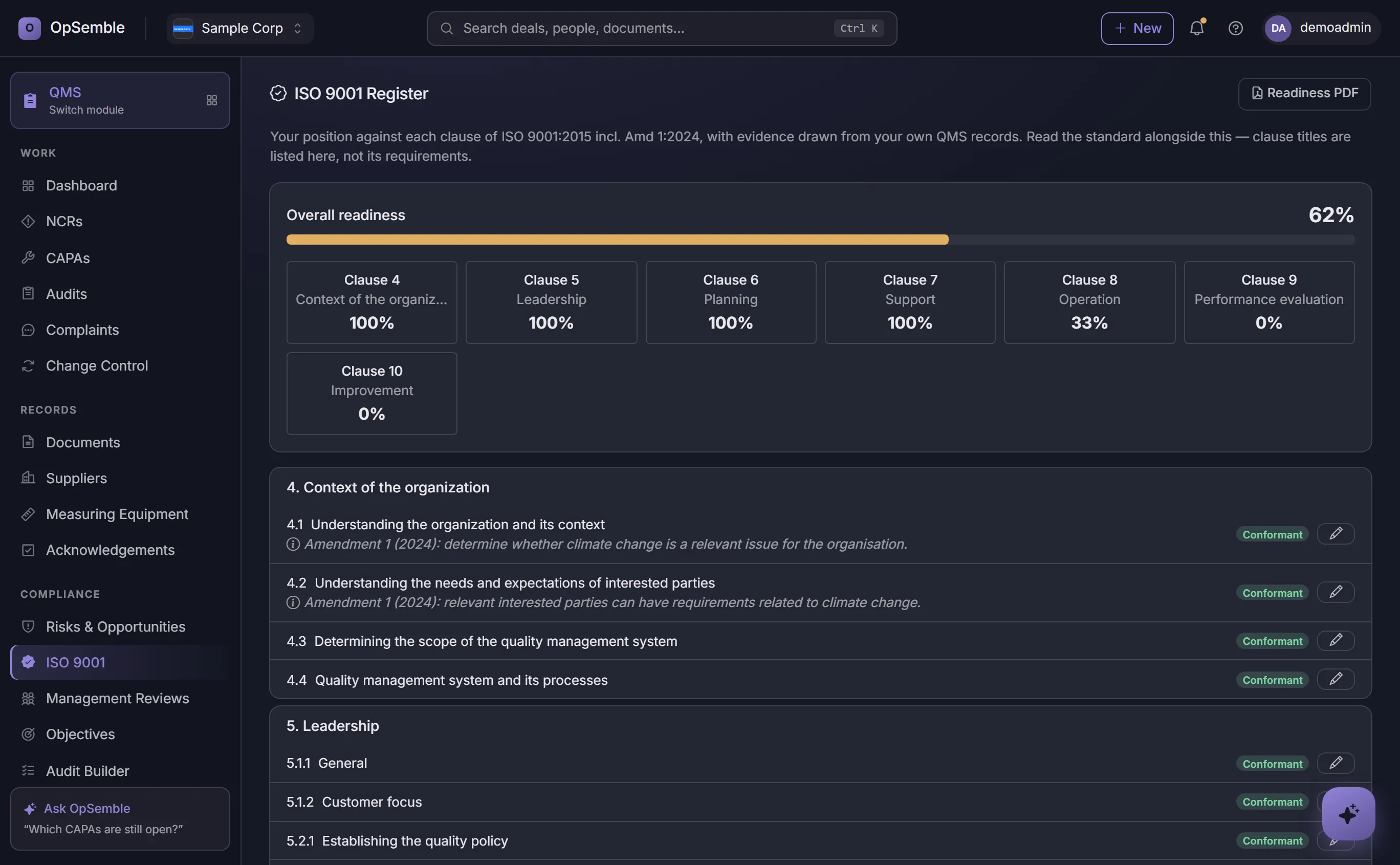
Know exactly how certification-ready you are
A clause-by-clause ISO 9001:2015 register — including Amendment 1 (2024) — tracks every clause as conformant, partially conformant, non-conformant or not assessed — with an overall readiness percentage, progress by section and a priority-gaps table that tells you where to focus first.
Evidence links straight from the records you already keep — controlled documents, NCRs, CAPAs, audits and supplier reviews — to the clauses they satisfy. When the certification body visits, each clause already carries its proof: a register, not a ring binder.
Quality Management Software for Small UK Businesses
Most small UK firms meet ISO 9001 the expensive way: a consultant writes the manual, the certificate goes on the wall, and the "system" lives in a folder nobody opens between audits. The alternative isn't a bigger folder — it's making the quality records part of how work actually happens, so the evidence writes itself.
That's the design here. A document can't skip its approval gate. An NCR can't close without its corrective action. Supplier reviews surface when they're due. When the certification body visits, the audit trail is a filter on real records, not a fortnight of reconstruction.
Enterprise eQMS platforms do all this too — priced for pharma. At £7 per user/month on top of the £29/month platform fee, quality stops being the module you defer. Manufacturers should also read our guide to supplier audits, inspections and document control, and see OpSemble for manufacturing for how QMS fits alongside inventory and projects.
Frequently Asked Questions
Does OpSemble QMS help with ISO 9001 compliance?
Yes. A clause-by-clause ISO 9001:2015 register, including Amendment 1 (2024), tracks every clause as conformant, partially conformant, non-conformant or not assessed, with an overall readiness percentage, progress by section and a priority-gaps table showing where to focus first. Evidence links straight from your controlled documents, NCRs, CAPAs, audits and supplier records to the clauses they satisfy, and the document workflows create the audit trail certification auditors expect.
How do NCRs and CAPAs work together?
Raise an NCR (non-conformance) when something doesn't meet standard. Link it to a CAPA (corrective action) with assigned owner, deadline and evidence tracking. Close the CAPA when corrective actions are complete and verified, with full audit trail.
Can I run internal audits in OpSemble?
Yes. Start from a ready-made clause-by-clause ISO 9001 internal audit, a supplier audit or a process audit — or build your own checklist in the audit builder. Run the audit on a phone or tablet with photos and signatures, raise an NCR from any failed question, and the completed run writes its evidence into the ISO 9001 register and produces a PDF report. Recurring schedules generate each occurrence for you.
How does supplier management work?
Record suppliers and their certifications (ISO, quality standards, etc.). Track expiry reminders, link suppliers to approved materials, and record audit results for external suppliers.
Can I control document revisions and who accesses them?
Yes. Version control tracks every revision with dates, authors and change logs. Approval workflows route documents to the right people. Superseded versions are archived, and you can track who's read the current version and when.
Does OpSemble QMS integrate with other modules?
Yes. Link QMS documents to H&S incidents and investigations, to HR training records (compliance training signed-off), and to Projects (quality gates and approval checkpoints).
Does it cover calibration and measuring equipment?
Yes. The measuring-equipment register (clause 7.1.5) holds each instrument's calibration cadence, next due date and certificate reference, with a dated logbook of every check. A failed calibration quarantines the instrument and raises a non-conformance linked to it, so the affected product can be traced.
What do I hand the auditor?
Files, not screen shares. Every register — NCRs, CAPAs, suppliers, risks, document acknowledgements — exports as a spreadsheet, the ISO 9001 register prints as a readiness report, and any controlled document prints as a PDF carrying its number, version, approver and review date with an "uncontrolled when printed" footer.
How do I evidence training on company procedures?
Link procedures to LMS training courses. When an employee completes training on a procedure, the training record logs in HR and links to the QMS document. You can instantly report who is trained on which procedures.
One platform. Only the modules you need.
Quality (QMS) is one switch in your OpSemble tenant — turn it on when you need it, alongside CRM, Projects, HR, Health & Safety, Quality and Training.
Build your planManufacturer? Read our guide to supplier audits, inspections and document control →
Looking for something specific? Non-conformance & CAPA software · Document control software